

root-detection · jailbreak · attestation
Root and jailbreak detection: what works, what does not, and what to do instead
On-device root and jailbreak checks are easy to add and easy to get wrong. A defensive look at what these checks can and cannot prove, why attestation changes the picture, and how to combine signals into a decision your server controls.
By Moatgator team7 min read
Ask ten mobile developers whether their app detects root or jailbreak and most will say yes. Ask what happens when it does, and the answers get quieter. The check exists, it shows a dialog, and the app closes. Whether that is protecting anything depends on a handful of questions that are rarely asked out loud: what is the check able to prove, who is it up against, and who makes the final decision.
This article is a defensive look at those questions. It contains nothing that works as a way around a check, and it avoids tool-specific recipes, because the useful lessons are architectural.
What a rooted or jailbroken device changes
A normal phone enforces a boundary: apps run in a sandbox, the operating system image is verified at boot, and an app cannot read another app's data. Root on Android and jailbreak on iOS remove parts of that boundary. Someone with that access can read your app's storage, inspect its memory, change what system calls return and run code inside your process.
This matters because many mobile security assumptions rest on the boundary being intact. Keys held in app storage, a local PIN check, a feature flag that an app reads from a file: each of those is weaker on a device whose owner, or whose malware, controls the system. The owner of the device is not always the attacker, though. Plenty of legitimate users root or jailbreak their phones for customization or research, and a rule that treats all of them as criminals will produce complaints and false alarms.
What on-device checks can see
The classic checks look for traces. Is there a binary or a package that is typical of a rooted system? Are system properties set to values that production builds never have? Is a system partition writable? Does the app run under a build marked for testing? On iOS, are there files, URL handlers or behaviors that only exist on a modified system?
These checks are valuable as signals, and each has the same limitation. They run inside an environment that the person you are worried about controls. A check is a question the app asks the device, and a device that has been modified can answer however its owner decides. This is why a pentester treats any single local check as a speed bump: the investment to neutralize it is real but small, and once it is neutralized for one app, the same effort frequently applies to others.
There are also false negatives built into the design. A new rooting method, a modification that hides its traces or a framework that hooks the very functions your check calls will produce "clean" results on a compromised device. And there are false positives: custom ROMs, developer devices, and unusual manufacturer builds can look suspicious without being malicious.
So the first rule is to describe these checks honestly in your own threat model. They detect the careless and the common. They do not detect the determined.
What does not work
Some patterns come up repeatedly in code reviews and are worth retiring.
- A single check that shows a dialog. One conditional that ends in an alert is a single point of failure. If the check is removed, the app behaves as if the device were clean, and you will never know.
- Crashing on detection. Closing the app immediately tells the person exactly which check fired and when, which is useful to them, and it gives you no data. It also generates one-star reviews from legitimate users on devices that tripped a heuristic.
- Local-only enforcement. If the decision to proceed or refuse lives only on the device, then it can be changed on the device. A banking operation approved by a local boolean is approved by whoever controls the boolean.
- Secrets that depend on the check. Storing a key and relying on root detection to protect it is the wrong direction. Assume the key may be read on a compromised device and design so that reading it is not enough.
- Treating obfuscation as detection. Hiding the check makes it harder to find, not harder to defeat once found.
What works better: make the server decide
The robust approach is to move the question to a party the attacker does not control. Both major platforms provide a way to do this.
On Android, the Play Integrity API returns a verdict about the device and the app that is produced and signed by Google and decoded on your server. A verdict that includes the "meets device integrity" label tells you the device is a genuine, certified one, and on recent versions the proof is backed by hardware. Hardware-backed key attestation, which is also documented by Android, goes a layer deeper: a key generated inside secure hardware can come with a certificate chain that your server verifies, proving that the key lives in real hardware on a device with a particular boot state.
On iOS, App Attest lets your app generate a key in the secure hardware and have Apple vouch that the key belongs to a genuine instance of your app on a genuine device. Your server then validates the attestation and checks assertions on later requests.
Why does this change the picture? Because the verdict is not something the app asserts about itself. A modified app or a modified device cannot manufacture a valid signed statement from the platform vendor. This does not make the system unbeatable, and attestation services have their own caveats, but the work an attacker must do shifts from "change one local boolean" to "defeat the platform's hardware-rooted trust", which is a different order of difficulty.
Combine signals into a policy
Neither on-device checks nor attestation is enough alone, so the mature design combines them and applies the result per operation.
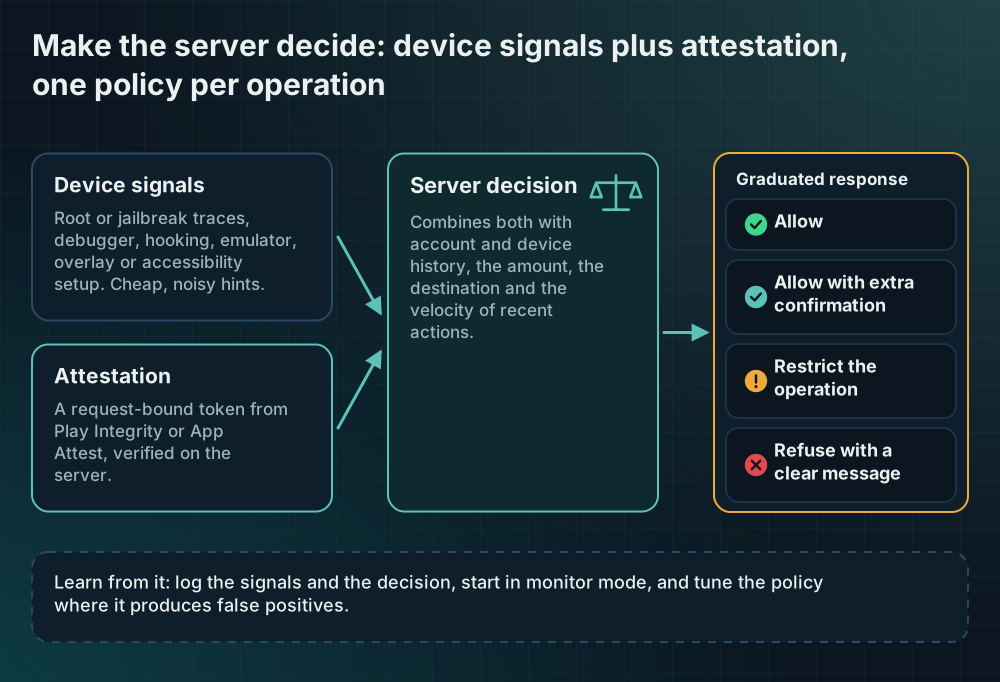
- Collect signals on the device. Root or jailbreak traces, debugger presence, hooking artifacts, an emulator, a dangerous overlay or accessibility configuration. Cheap, noisy, useful as hints.
- Collect attestation. A request-bound token from the platform, sent with the sensitive operation.
- Decide on the server. Combine both with what the server already knows: account history, device history, the amount, the destination, the velocity of recent actions.
- Apply a graduated response. Allow, allow with extra confirmation, restrict the operation, or refuse with a clear message. Reserve refusal for the cases where the risk is high and the evidence is strong.
- Learn from it. Log the signals and the decision so you can see false positives, tune the policy, and spot new patterns.
This also helps the legitimate user. A person with a rooted phone who only checks their balance does not need to be blocked. The same person transferring a large amount to a new payee can be asked for a second factor.
Start in monitor mode
Whatever you build, do not begin by enforcing. Collect for a few weeks, look at how many of your real users trip each signal, and confirm that your reading of the signals matches reality. Enforcement before measurement is how apps end up locking out customers on a popular device model.
When you do enforce, tell people what happened in plain language, offer a path forward where one exists, and keep the message free of technical detail that would help an attacker tune their approach.
Measuring where you are
If you want a quick view of whether your release package contains these protections at all, a static scan can look for the presence of known signals and score them against the platform-integrity and dynamic-analysis controls of the OWASP standard. Moatgator's free Scan does this by reading an APK, AAB or IPA without running it. Keep in mind what that result means: it reports what a static reading found, and a protection that is hidden, packed or loaded at runtime will be reported as not detected. It is a starting point for a conversation with your team, not a certificate.
The honest summary
Root and jailbreak detection is worth having as one input, because it catches the common cases cheaply and gives your server context. It is not a lock. The design that holds up treats every local check as a hint, uses platform attestation as the source of truth about the device, and puts the decision on a server that can see more than the client can. If you remember one thing, make it this: the question "is this device trustworthy" should be answered by someone who is not the device.
Sources
Every claim above can be checked here. If a link changed, tell us and we will fix the article.
- OWASP MASVS-RESILIENCE-1: platform integrity
- OWASP MASVS-RESILIENCE-4: anti-dynamic analysis
- OWASP MASTG: Mobile Application Security Testing Guide
- Android developers: Verify hardware-backed key pairs with key attestation
- Android developers: Integrity verdicts (Play Integrity)
- Apple developer documentation: Establishing your app's integrity (App Attest)