

play-integrity · android · attestation
Play Integrity in practice: verdicts, app access risk and the 10,000 requests per day quota
A practical guide to using the Play Integrity API on a real backend: what each verdict means, how to read the app access risk signal, how to design a policy per operation, and how to ask for more than the default daily quota.
By Moatgator team7 min readRead this article in Portuguese
The Play Integrity API lets your server ask Google a narrow question: is this request coming from my genuine app, installed from Google Play, on a genuine and uncompromised Android device? The answer arrives as a signed token that your backend decodes. When it is wired up well, it turns a whole category of "trust the client" bugs into decisions the server can make. When it is wired up carelessly, it gives a false sense of security and a surprising number of production incidents.
This article covers what is in the verdict, how to make a decision from it, how the app access risk signal helps with remote-access fraud, and how the default quota works. The facts about verdict fields and quota come from Google's documentation, linked at the end, and you should re-check them there because the API evolves.
The shape of a verdict
You do not read the token in the app. The app asks the Play services library for a token, sends it to your server together with the request it protects, and your server decodes it through Google's API. The decoded verdict has a few groups of fields.
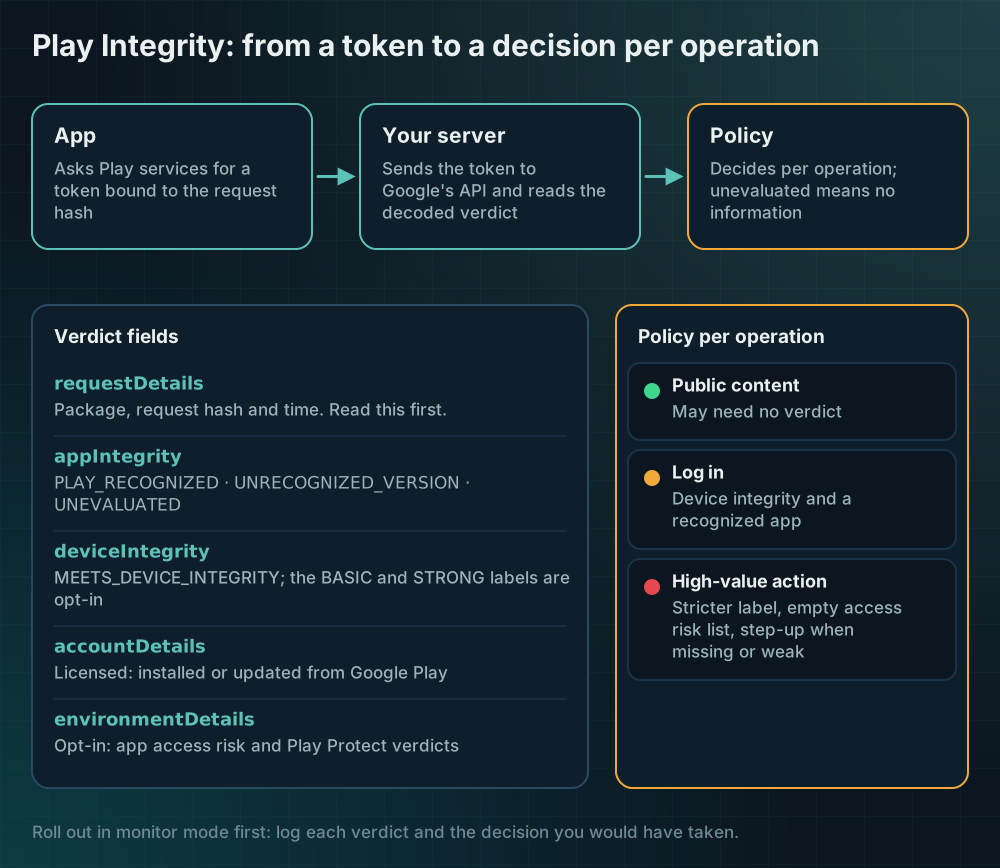
- requestDetails says which package asked, which request hash (or nonce, for the older classic requests) it was bound to, and when. Read this first, before anything else.
- appIntegrity says whether the binary and signing certificate match what Google Play distributed. The values are
PLAY_RECOGNIZED,UNRECOGNIZED_VERSIONandUNEVALUATED. - deviceIntegrity is a list of labels.
MEETS_DEVICE_INTEGRITYmeans a genuine, certified device. The optionalMEETS_BASIC_INTEGRITYandMEETS_STRONG_INTEGRITYlabels need to be enabled, andMEETS_STRONG_INTEGRITYis stricter, requiring recent security updates on newer Android versions. An empty list is itself an answer: it points to signs of compromise or to something that is not a physical device. - accountDetails tells you whether the app was licensed, meaning installed or updated from Google Play by that user.
- environmentDetails is opt-in. It carries the app access risk verdict and the Play Protect verdict.
Two practical consequences follow. First, a field can be absent for good reasons: when the device is not trustworthy enough, several other fields are UNEVALUATED, so your code must treat "unevaluated" as "no information", not as "fine". Second, the verdict is a statement about a moment in time, so you must check its freshness.
Bind the token to the request
The most common mistake is to verify that a token is valid and stop. A valid token proves very little if an attacker can capture one from a legitimate session and replay it. The standard API fixes this with a request hash: the app computes a hash of the operation it is about to perform (the amount, the recipient, a server nonce) and passes it when it asks for the token. Your server recomputes the same hash and compares it with the one in the verdict.
Do three checks before you look at any other field: the package name is yours, the request hash is the one you expect for this operation, and the timestamp is recent. Google's documentation recommends exactly this order, and notes that the order of fields in the payload is not guaranteed, so do not rely on position.
Here is a small, self-contained decision function in JavaScript. It does not call Google; it takes an already-decoded verdict and a policy, and returns an allow or deny with a reason, which is the part that is easy to get wrong and easy to test.
// Decide what to do with an already-decoded Play Integrity verdict.// `expected` comes from your own server: package, request hash and a freshness window.function decide(verdict, expected, policy, nowMillis) { const req = verdict.requestDetails ?? {}; if (req.requestPackageName !== expected.packageName) return deny("wrong-package"); if (req.requestHash !== expected.requestHash) return deny("request-hash-mismatch"); if (!(nowMillis - Number(req.timestampMillis) <= expected.maxAgeMillis)) return deny("stale-token"); const labels = verdict.deviceIntegrity?.deviceRecognitionVerdict ?? []; if (policy.device === "strong" && !labels.includes("MEETS_STRONG_INTEGRITY")) return deny("device-not-strong"); if (policy.device === "device" && !labels.includes("MEETS_DEVICE_INTEGRITY")) return deny("device-not-certified"); if (policy.requireRecognizedApp && verdict.appIntegrity?.appRecognitionVerdict !== "PLAY_RECOGNIZED") return deny("app-not-recognized"); const apps = verdict.environmentDetails?.appAccessRiskVerdict?.appsDetected ?? []; const risky = apps.filter((a) => a.endsWith("_CAPTURING") || a.endsWith("_CONTROLLING") || a.endsWith("_OVERLAYS")); if (policy.blockOnAccessRisk && risky.length > 0) return deny("app-access-risk"); return { allow: true, reason: "ok" };}function deny(reason) { return { allow: false, reason };}Notice that the function never returns "allow" because a field is missing. Missing means unknown, and unknown on a sensitive operation should step up to another check rather than pass.
Design a policy per operation
A single global rule ("block everything that is not strong") is both too strict and too weak. It is too strict because a share of your real users run older or unusual devices, and locking them out of reading their balance is a support problem. It is too weak because the same rule applies to moving money.
Define the policy by operation. Reading public content may need no verdict. Logging in may need MEETS_DEVICE_INTEGRITY and a recognized app. A high-value action may need the stricter label and an empty access risk list, plus a step-up (a biometric confirmation, a delay, a manual review) when the verdict is missing or weak.
Roll out in monitor mode first. Log the verdict and your hypothetical decision for every request for a couple of weeks before you enforce anything. You will learn which of your real users would have been blocked, and you will find the integration bugs (a wrong package name in a debug flavor, a request hash computed differently on the client and server) while they only cost you log lines.
App access risk and remote-access fraud
The app access risk verdict is the signal most relevant to remote-access and overlay fraud. It is opt-in, and you enable it in the Play Console. It lists categories of other apps on the device that could view the screen, control the device or draw over your app, split into known apps (installed from Google Play or preloaded) and unknown ones. Verified accessibility services are excluded from the list.
How you use it depends on the operation. Blocking every user who has a screen reader or a screen recorder would be wrong, and it would discriminate against people who rely on accessibility tools. A better pattern is graduated: for low-risk operations ignore it, for a sensitive operation require extra confirmation when an unknown capturing or controlling app is present, and for the highest-risk operation refuse and explain in plain language that another app may be able to see or control the screen.
Remember what this signal is: a hint produced by Google about what is installed, not proof of fraud. Combine it with server-side evidence such as a new device, a sudden change in behavior or an unusual destination.
The default quota and how to raise it
Play Integrity is not unlimited. According to Google's documentation, the default is 10,000 requests per day per app, tied to the Cloud project linked to the app. Token requests, whether classic or standard, count toward this number, and so do server-side decryptions. If your app has more daily active users than that, or if you request a token on every screen, you will hit the ceiling and your verification will start failing in the middle of the day.
Two design rules reduce pressure on the quota before you ask for more. Request a token only for operations that need one, not on app start. And handle quota errors with a retry strategy that has backoff, with a fallback policy that is safe: for a sensitive operation, fail closed or step up; for a low-risk one, allow and log.
When you need more, the process is to link your Google Cloud project to the app in the Play Console, make sure the integration is correct (including the recommended retry behavior), and submit the quota request form. The documentation says the app must be available on Google Play, and that an increase can take up to about a week, so ask well before a launch or a campaign, not on the day. Set quota alerts in the Cloud console so you see the curve approaching the limit.
What it does not do
Play Integrity does not know whether your user is the legitimate owner of the account. It does not detect a social-engineering scam in which a real person on a real device is tricked into approving a payment. It does not cover iOS, where App Attest plays a similar role. And it can be slower or unavailable on devices without Google Play services, which in some markets is a meaningful share of users.
Treat it as one strong signal in a layered design, with a clear policy, a safe fallback and a plan for the quota, and it will earn its place. Treat it as a switch that makes fraud go away and it will disappoint you.
Sources
Every claim above can be checked here. If a link changed, tell us and we will fix the article.