

pix · fraud · android
How Pix remote-access and overlay scams work, and what a banking app can do about them
Brazil's instant payment system attracts Android malware that watches the screen, abuses accessibility and swaps a payee at the last second. A defensive explanation of the pattern, the platform changes of 2026, and the controls an app can add.
By Moatgator team7 min readRead this article in Portuguese
Pix settles in seconds and cannot be undone by the payer. Those two properties make it wonderful for businesses and attractive for criminals. In March 2026 Zimperium's research team described a family of Android malware called PixRevolution, and the way it works is a useful case study, because it combines three ideas that appear in many financial-fraud campaigns: abuse of accessibility, live observation of the screen, and a last-second change to the payee.
This article explains the pattern at the level a defender needs, summarizes the platform changes that landed in Brazil in 2026, and lists the controls a banking or payments app can add. It does not include operational detail about how to build or run such malware, and neither should any article on this topic.
The pattern, step by step from the victim's side
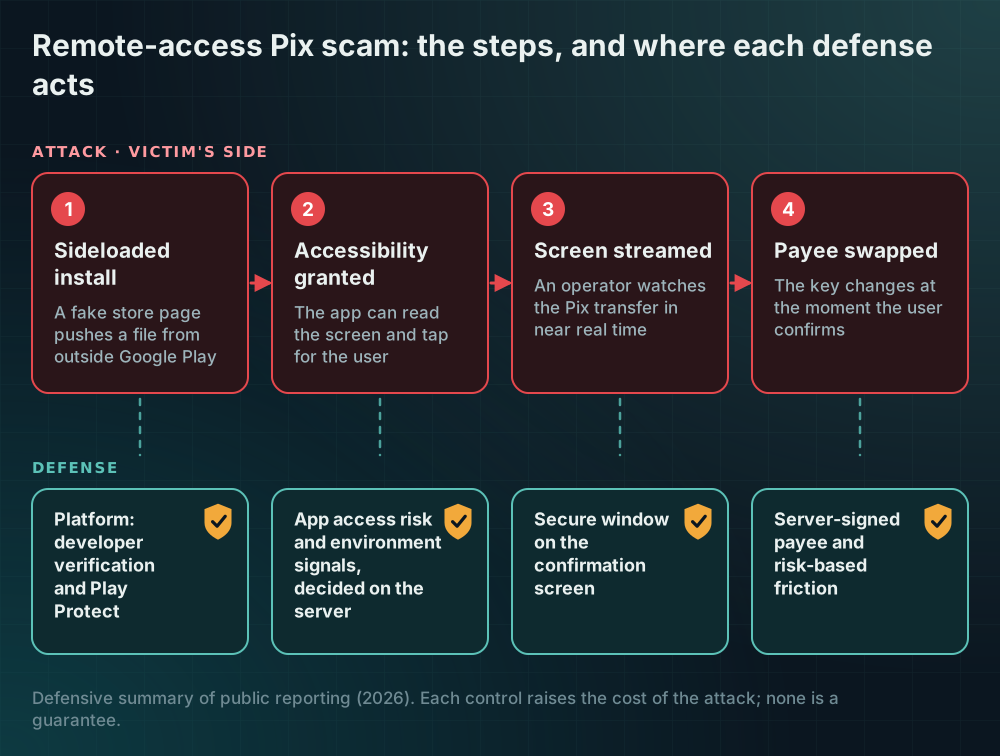
The campaign described in public reporting starts with distribution. Victims are lured to a fake app store page that imitates a legitimate listing and are pushed to install an Android package from outside the official store. This is called sideloading, and it matters because the official store applies checks that a manually installed file never meets.
After installation the app asks for accessibility permission, usually with a plausible reason such as "needed for the app to work". Accessibility services exist to help people with disabilities, and for that reason they have powerful abilities: they can read what is on screen and perform taps and text input on the user's behalf. In the wrong hands those abilities are exactly what fraud needs.
With that permission and a screen-capture capability, the malware streams the screen to the attacker's server. According to the public reports, PixRevolution then waits. When the victim starts a Pix transfer, a remote operator watches in near real time. At the moment the user confirms, the malware shows a brief "please wait" screen and changes the recipient's key to one the attacker controls. The victim sees a normal-looking flow and a confirmation, and the money goes elsewhere. Zimperium described this as an "agent in the loop" model, where the operator can be a person or an automated agent, which is what makes it hard to catch with simple scripted-behavior rules.
A second family of attacks, the overlay, works differently but with the same permission surface. A fake window is drawn on top of the real banking app to collect credentials or to mask what is really being submitted. Remote-access Trojans and overlay kits are often shipped together.
Why the app itself is hard to blame, and still has to act
The banking app in this story is usually genuine and unmodified. The attack happens around it, from another app on the same device. That is why the traditional resilience controls (obfuscation, tamper detection) do not stop it by themselves: nothing about your binary was touched.
Still, the app can do several things, because it runs in the same environment and because it controls the sensitive moment. The goal is not to guarantee safety on a compromised device, which no app can do. The goal is to make the attack harder, noisier and less profitable, and to hand the decision to the server where possible.
What an app can do
1. Ask the platform what else is on the device
Google's Play Integrity API offers an opt-in "app access risk" signal that reports whether other apps on the device could capture the screen, control the device or draw overlays, distinguishing between known and unknown apps. Verified accessibility services are excluded, which is helpful because a legitimate screen reader should not be punished. A backend can use this signal to require extra confirmation before a high-value transfer when an unknown capturing or controlling app is present.
Use it carefully. It is a hint, not proof, and a blunt "block everyone who has a screen recorder" policy harms people who depend on assistive technology and drives support costs. A graduated response works better: ignore it for reading a balance, step up for a new payee, refuse with a clear message for the largest operations.
2. Protect the sensitive screen itself
Android lets an app mark a window as secure so it cannot appear in screenshots or non-secure screen recording. For payment confirmation screens this is a cheap and sensible control, although it is not absolute: an accessibility service reads the view hierarchy rather than a bitmap, so you also want to limit what the hierarchy exposes. You can mark views that carry sensitive content as not important for accessibility where doing so does not harm a genuine user who relies on those services, and you must test that trade-off with assistive-technology users, not assume it.
3. Make the payee unchangeable after the user has seen it
PixRevolution succeeds because the data the user confirmed is not the data that was sent. The most effective defense is to bind them. Show the payee name that your server resolves from the key, not just the key, and have the server sign the exact transaction details (amount, resolved name, key) that the user confirms. The confirmation step then authorizes that signed object, and any change in transit invalidates it. This does not depend on detecting the malware at all.
4. Raise friction where fraud concentrates
Pix fraud tends to follow a profile: a new device, a new payee, a large first transfer, an unusual hour, or a session that recently changed an accessibility setting. Server-side risk rules that add a delay, a second factor or a cooling-off period for these combinations cut losses without bothering most customers. Limits and delays are a familiar tool in payments, and an app can apply the same idea per user and per situation.
5. Detect the environment, and report it
Detecting that an accessibility service is enabled, that the screen is being captured, or that an overlay permission is granted to another app are all signals your app can send to the backend. Do not crash or show a scary error on detection; you would teach the attacker what triggers it and you would frustrate genuine users. Send the signal to the server, where it adds weight to a risk decision, and respond with a calm, specific message when you do need to refuse.
What changed in Brazil in 2026
Two platform developments matter for this threat, and it is worth being precise about what each does and does not do.
First, Google's developer verification requirement. According to Google's documentation, from 30 September 2026 apps installed through participating stores on certified Android devices in Brazil, Indonesia, Singapore and Thailand must come from registered developers. Installing an unregistered app is not impossible; it goes through a more involved "advanced flow" or the developer tools. The aim is to make anonymous distribution of malware harder and to make a banned developer harder to replace.
Second, Play Protect's enhanced fraud protection. Public reporting from 2024 and 2025 describes pilots, Brazil among them, in which Play Protect blocks installation from an internet-sideloading source of an app that requests high-risk permissions such as accessibility, notification access or SMS reading. Google reported that in its analysis of major fraud malware families, more than 95 percent of installations came from sideloading sources. Verify the current scope in Google's own pages, because pilots change.
Neither measure makes your app safe. A device that is already compromised, a user who is tricked into the advanced flow, or a store that is not covered all remain possible. Think of them as lowering the number of infected devices rather than as a guarantee, and keep your server-side controls.
A checklist you can act on this quarter
- Enable the app access risk signal and log it for a few weeks before you enforce anything.
- Add a signed, server-resolved confirmation for payments so the data the user saw is the data that is authorized.
- Mark confirmation windows as secure and test the accessibility trade-offs with real users.
- Add risk rules for new device plus new payee plus high amount, with a delay or second factor.
- Send environment signals to the backend, and decide there.
- Write a customer message that explains, in plain Portuguese, why you will ask for extra confirmation, so support is not surprised.
Pix fraud is a moving target, and this article describes what was public in 2026. The principle that lasts is simple: do not let the client be the only judge of a payment, and make every sensitive confirmation something the server can verify.
Sources
Every claim above can be checked here. If a link changed, tell us and we will fix the article.
- The Hacker News: Six Android malware families target Pix payments and more (March 2026)
- Infosecurity Magazine: PixRevolution malware hijacks Brazil's Pix transfers in real time
- Android developers: Android developer verification
- The Hacker News: Google blocks sideloaded Android apps that request risky permissions (Play Protect pilots)
- Tecnoblog: Android ganha proteção contra sideloading no Brasil para evitar golpes
- Android developers: Integrity verdicts (app access risk)