

owasp-masvs · pentest · resilience
How to pass the resilience item of a mobile pentest: the four MASVS-RESILIENCE controls
Pentest reports for mobile apps often end with a resilience finding. Here is what the four OWASP MASVS-RESILIENCE controls actually ask for, what evidence a tester looks for, and how to close the gaps without false confidence.
By Moatgator team8 min readRead this article in Portuguese
If your company sells a mobile app that handles money, health data or credentials, sooner or later a pentest report will land on your desk with a line that says something like "the application lacks resilience against reverse engineering and tampering". Developers often read that line as vague. It is not vague. It maps to a specific group of controls in the OWASP Mobile Application Security Verification Standard, and each control has a concrete question a tester answers by looking at your build.
This article walks through those four controls, explains what a tester checks for each one, and describes honest ways to close the gaps. It is written for the engineer who has to reply to the report, not for the person who wrote it. Everything here is defensive: we describe what to build and how to verify it, and nothing that works as a way around it.
What MASVS-RESILIENCE is, and what it is not
The MASVS organizes mobile security requirements into groups such as storage, cryptography, authentication, network and platform. One group, MASVS-RESILIENCE, is different from the rest. The other groups ask whether your app is built correctly. This one asks how hard it is for an attacker who already holds your app, on a device they control, to understand it and change it.
That framing matters. Resilience controls do not fix a vulnerability. A missing authorization check on your server is not made safe by obfuscation. What resilience does is raise the cost of finding and exploiting problems, and make some classes of fraud (a modified build, an instrumented session, a compromised device) visible to you instead of silent.
The standard says so itself: these controls are meant for apps whose threat model includes a determined local attacker, such as banking, payments, games with real-money economies, and apps that protect intellectual property. If your app is a simple read-only catalog, a pentest that asks for all four may be asking for more than your risk justifies. Decide from your threat model, not from the checklist.
The four controls
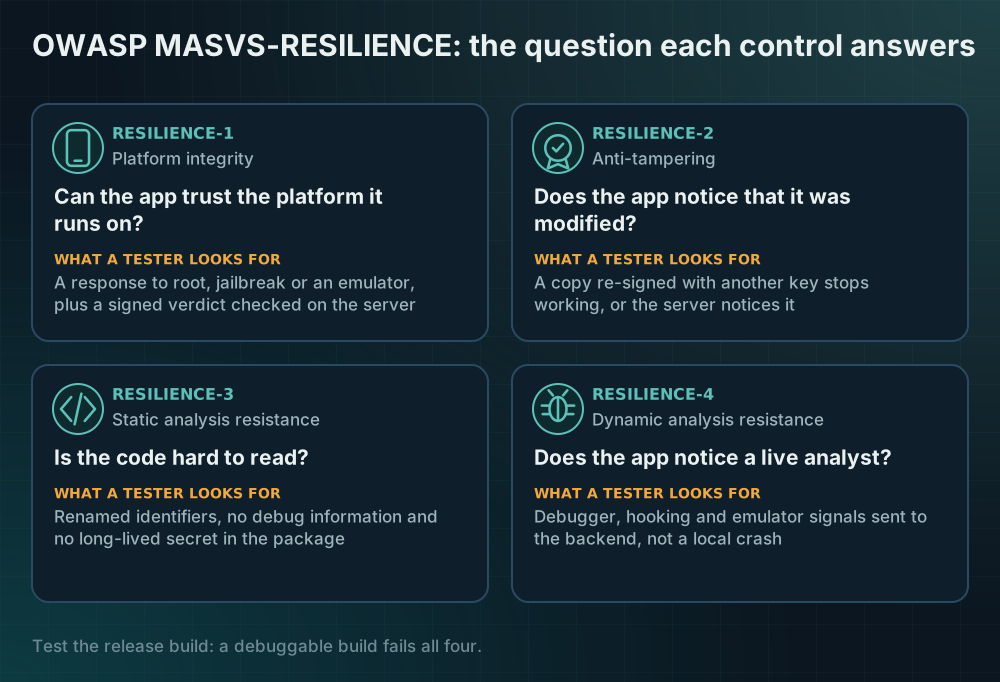
There are four controls, and a useful way to remember them is by the question each one answers.
- RESILIENCE-1: Can the app trust the platform it runs on? The app validates the integrity of the platform: it tries to notice a rooted or jailbroken device, a debuggable system image or an emulator, and it can ask the operating system vendor for a signed statement about the device.
- RESILIENCE-2: Does the app notice that it was modified? The app implements anti-tampering mechanisms: it checks that its own code and signing identity are the ones you shipped, and it reacts when they are not.
- RESILIENCE-3: Is the code hard to read? The app implements anti-static-analysis mechanisms: identifiers are renamed, sensitive strings are not sitting in plain text, and debug information is removed.
- RESILIENCE-4: Does the app notice a live analyst? The app implements anti-dynamic-analysis techniques: it responds to an attached debugger, to hooking frameworks and to an emulated environment.
A pentester working through the testing guide will exercise each of these against your release build, so the first practical advice is to test the build that actually ships. A debug build with symbols and debuggable enabled will fail every one of them, and the report will say so.
RESILIENCE-1: platform integrity
What a tester looks for is whether the app does anything at all when the device is untrustworthy, and whether that response is robust or trivially skipped. There are two layers.
The first layer is on-device heuristics: looking for signs of root or jailbreak, a writable system partition, debug flags on the OS image, or an emulator. These checks are cheap and useful, and they are also the easiest to defeat on a device the attacker controls. Treat them as a signal, never as a gate.
The second layer is a signed statement from the platform vendor. On Android that is the Play Integrity API, and on iOS it is App Attest. Their value is that the verdict is produced and signed by the vendor and verified on your server, so a modified app cannot simply return "all good". The cost is that you need a backend that checks the verdict and a policy for what to do with each answer.
To close the gap without false confidence, combine both layers and make the server the decision maker. Send a request-bound token with sensitive operations, verify it server-side, and decide what each outcome means for that operation. Moving money may require a strong verdict; reading a public page may require nothing.
RESILIENCE-2: anti-tampering
The tester repackages your app, changes something small, signs it with their own key and installs it. The question is whether the modified copy still works and whether anyone notices. The honest answer for most apps is that it works perfectly and nobody notices.
Useful controls here are signature verification at runtime, checking the installer source, and, again, server-side attestation of the app identity. Play Integrity reports whether the app binary and certificate match what Google Play distributed, and App Attest ties requests to a key that exists only in your genuine app instance on a genuine device.
Be careful with purely local integrity checks. A check that compares a hash and then shows an error dialog is one conditional jump that an attacker can remove. Local checks are a speed bump that works best when they feed a value into something the server verifies, so removing the check also removes the ability to complete the operation.
RESILIENCE-3: static analysis resistance
The tester opens your package and tries to read it. Name obfuscation and code shrinking, which Android build tools provide, make this slower. So does stripping debug symbols and keeping secrets out of the package altogether. For apps written with React Native or Flutter the interesting logic often lives in a JavaScript bundle or compiled Dart, so the obfuscation options of those toolchains matter as much as the native ones.
This is the control where honesty matters most, because obfuscation is the most oversold. It delays a reader; it does not stop one. The single most valuable action under this control is not obfuscating at all: it is making sure no long-lived secret is in the package. A payment key, a cloud credential or an admin token embedded in the app is readable by anyone, and no renaming scheme changes that. Move secrets to a server and give the app short-lived, scoped tokens.
RESILIENCE-4: dynamic analysis resistance
The tester runs your app under a debugger or a hooking framework and watches what happens. Typical defensive responses include detecting a debugger attached to the process, noticing well-known instrumentation artifacts, and refusing sensitive operations in an emulated environment. As with the platform checks, these are all signals that run on a device the attacker controls, so assume a determined analyst can neutralize any single one.
The value is in layering and in reacting sensibly. Reporting the signal to your backend, where it can be combined with other evidence (device history, unusual velocity, a failing attestation), is stronger than a local crash. A crash also teaches the analyst exactly which check fired.
How a report is usually scored
Testers rarely grade a binary pass or fail. They record, for each control, whether protections were found, whether they were effective against a reasonable attempt, and whether they are layered. That means you can move the result in two ways: add protections that are absent, and make existing ones harder to remove by tying them to server decisions.
If you want to see where you stand before the tester does, a static scan of the release package gives a first approximation. Moatgator's free Scan reads an APK, AAB or IPA and scores the four controls at 25% each, with a letter from A to F. It is important to understand the limit of that approach: the scan only reads bytes and never runs the app. A protection hidden inside a commercial packer or loaded at runtime shows up as "not detected", and "not detected" is not "vulnerable". Use the result as a to-do list, not as a verdict.
A practical order of work
If you have a report open and a deadline, this order tends to give the most protection per hour.
- Make sure the release build is not debuggable, has no debug certificate and has shrinking enabled.
- Remove long-lived secrets from the package and replace them with short-lived tokens issued by your server.
- Add server-verified attestation (Play Integrity and App Attest) to the operations that matter, with a written policy for each verdict.
- Add on-device signals for root, jailbreak, debugger and hooking, and send them to the backend instead of crashing.
- Re-test, and keep the evidence: the build, the configuration and the server logs that show the policy running.
What no control will give you
None of these controls make an app unbreakable, and a vendor who promises that is selling something. A resilient app is one where defeating the protections takes a skilled person real time, where doing so leaves a trail on your server, and where the money or data at stake does not depend on a single client-side check. If your report asks you to "pass" resilience, the honest target is the second and third of those: cost and visibility. Write that into your reply to the report, include your threat model, and let the tester judge the build against it.
Sources
Every claim above can be checked here. If a link changed, tell us and we will fix the article.
- OWASP MASVS: Mobile Application Security Verification Standard
- OWASP MASVS-RESILIENCE-1: platform integrity
- OWASP MASVS-RESILIENCE-2: anti-tampering
- OWASP MASVS-RESILIENCE-3: anti-static analysis
- OWASP MASVS-RESILIENCE-4: anti-dynamic analysis
- OWASP MASTG: Mobile Application Security Testing Guide
- Android developers: Play Integrity API
- Apple developer documentation: Establishing your app's integrity (App Attest)